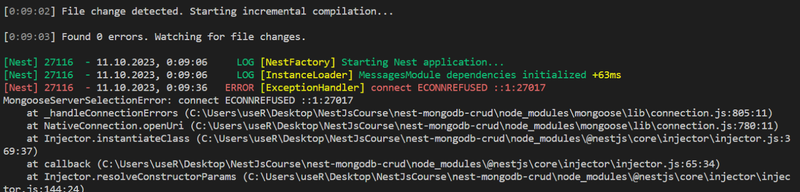
How to solve MongoServerSelectionError - connect ECONNREFUSED ::1:27017 in NestJS
The “MongoServerSelectionError: connect ECONNREFUSED” error occurs when your Node.js application is unable to connect to a MongoDB server. This issue is typically caused by one or more of the following problems:
For NestJS simply replace the localhost with 0.0.0.0
mongoose.connect(‘mongodb://0.0.0.0:27017/nest-mongodb-crud’)
1. MongoDB Server Not Running
- Ensure that your MongoDB server is up and running. You can start the MongoDB server with the following command:
- If MongoDB is running as a service, you can start it using the service manager for your operating system (e.g., systemctl on Linux).
2. Incorrect MongoDB Host and Port:
-
Double-check the MongoDB server’s host and port in your application’s connection configuration. Ensure that they match the MongoDB server’s settings.
-
By default, MongoDB runs on localhost (127.0.0.1) at port 27017. If your MongoDB server is running on a different host or port, make the necessary changes in your application’s connection settings.
3. Firewall or Network Issues
-
Verify that there are no firewall rules or network issues blocking the connection to the MongoDB server. Ensure that the port used by MongoDB (usually 27017) is open for incoming connections.
-
If you’re running MongoDB on a remote server, ensure that the server allows incoming connections from your application’s IP address.
4. MongoDB Bind IP Configuration
Check MongoDB’s configuration file (usually mongod.conf) to ensure that the bindIp or bindIpAll setting allows incoming connections from your application’s IP or network range.
5. MongoDB Authentication
If your MongoDB server requires authentication, make sure that you provide the correct username and password in your application’s connection string.
6. MongoDB Driver Version
Ensure that you are using a compatible version of the MongoDB driver for Node.js. In some cases, updating or downgrading the driver can resolve connectivity issues.
7. Connection String Format
Verify that the connection string in your application is correctly formatted. It should follow the standard MongoDB URI format, such as:
mongodb://username:password@host:port/database8. Temporary Network or Server Issues
Sometimes, the error may occur due to temporary network or server issues. Restart your MongoDB server and try connecting again.
9. Docker Container Issues (if applicable)
If you are running MongoDB in a Docker container, ensure that the container is running and properly configured. Check port mappings and container health.
10. DNS Resolution
Ensure that the hostname in your MongoDB connection string can be resolved to the correct IP address. Sometimes, DNS issues can prevent proper name resolution.
11. Proxy Settings
If your application is behind a corporate firewall or uses a proxy, check your proxy settings and ensure they are correctly configured to allow connections to the MongoDB server.
By systematically checking these possible causes, you should be able to identify and resolve the “MongoServerSelectionError: connect ECONNREFUSED” error in your Node.js application when connecting to MongoDB.