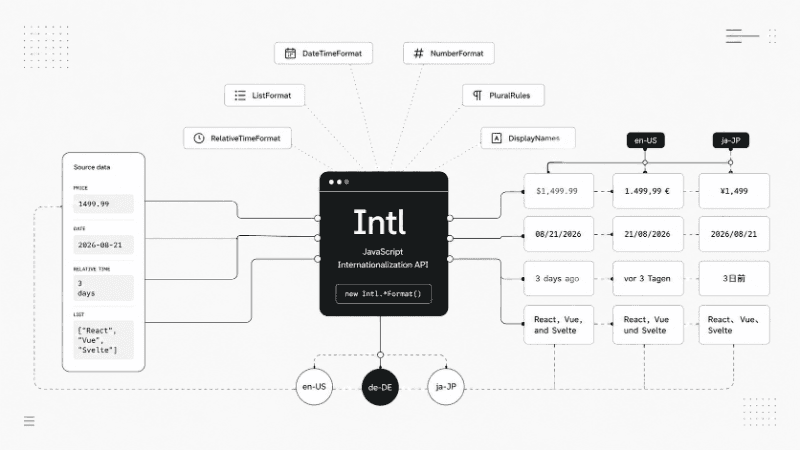
Internationalization is easy to underestimate. At first, it looks like a translation problem: take a string in English, provide another version in German or Japanese, and you’re done.
Real applications run into a different set of problems.
How should 123456.78 be displayed to someone in Germany? What does the same date look like in the US and the UK? Should an interface say 1 day ago, yesterday, or something completely different in another language?
These are formatting problems, and writing the rules yourself gets messy very quickly.
JavaScript already has an API built for them: Intl.
It can format dates, numbers, currencies, units, lists, relative dates, plural categories, and localized names without adding another formatting library to your bundle.
Let’s look at the parts of Intl that are actually useful in everyday JavaScript.
Start With the Locale
Most Intl APIs need a locale.
You have probably seen locale strings such as:
en-US
en-GB
de-DE
fr-FR
ja-JP
They carry more information than a language name. A locale can describe the language, writing system, region, and other preferences that affect how information should be displayed.
For example, en-US and en-GB are both English, but dates are commonly formatted differently:
en-US:  8/21/2026
en-GB:  21/08/2026
In a browser, one reasonable starting point is the language declared by the page:
const locale = document.documentElement.lang || "en-US";If the application should follow the user’s browser preference instead, you can use:
const locale = navigator.language || "en-US";You don’t have to use the same locale everywhere. Sometimes a page has one language while a specific piece of data needs another locale.
const formatter = new Intl.NumberFormat("zh-CN", {
  style: "currency",
  currency: "CNY",
});

console.log(formatter.format(199.99));
Intl also accepts a list of preferred locales and can select an available match.
1. Format Dates With Intl.DateTimeFormat
Date formatting is one of the easiest places to create localization bugs.
You could manually build a date:
const date = new Date();

const result =
  date.getDate() +
  "/" +
  (date.getMonth() + 1) +
  "/" +
  date.getFullYear();
But now you own the formatting rules.
And those rules change depending on locale.
Intl.DateTimeFormat handles that part for you:
const date = new Date("2026-08-21T14:30:00");

const formatter = new Intl.DateTimeFormat("en-US", {
  year: "numeric",
  month: "long",
  day: "numeric",
});

console.log(formatter.format(date));
// August 21, 2026
Change the locale and the formatter changes the output:
const date = new Date("2026-08-21T14:30:00");

console.log(
  new Intl.DateTimeFormat("en-US").format(date)
);

console.log(
  new Intl.DateTimeFormat("de-DE").format(date)
);

console.log(
  new Intl.DateTimeFormat("ja-JP").format(date)
);
The JavaScript stays essentially the same. The locale controls how the result is presented.
For common formats, dateStyle and timeStyle keep the configuration short:
const formatter = new Intl.DateTimeFormat("en-GB", {
  dateStyle: "full",
  timeStyle: "short",
});

console.log(formatter.format(new Date()));
If you need more control, individual options are available:
const formatter = new Intl.DateTimeFormat("en-US", {
  weekday: "long",
  year: "numeric",
  month: "long",
  day: "numeric",
  hour: "numeric",
  minute: "numeric",
  timeZone: "America/New_York",
});

console.log(formatter.format(new Date()));
This is much easier to maintain than assembling localized date strings manually. The API supports individual date and time fields as well as predefined styles.
2. Format Numbers and Currencies With Intl.NumberFormat
A number is still a number regardless of where your user lives:
const price = 123456.78;Its display format is another story.
In the US, you might see:
123,456.78In Germany:
123.456,78Instead of manually replacing separators, let NumberFormat handle them:
const price = 123456.78;

const us = new Intl.NumberFormat("en-US");
const de = new Intl.NumberFormat("de-DE");

console.log(us.format(price));
console.log(de.format(price));
Currency formatting is just an option:
const price = 123456.78;

const usd = new Intl.NumberFormat("en-US", {
  style: "currency",
  currency: "USD",
});

const eur = new Intl.NumberFormat("de-DE", {
  style: "currency",
  currency: "EUR",
});

console.log(usd.format(price));
console.log(eur.format(price));
Notice that you don’t manually add $ or €. The formatter decides how the currency should be displayed for the selected locale.
Percentages
NumberFormat works well for percentages too:
const progress = 0.725;

const formatter = new Intl.NumberFormat("en-US", {
  style: "percent",
  maximumFractionDigits: 1,
});

console.log(formatter.format(progress));
// 72.5%
Units
You can also format units:
const distance = new Intl.NumberFormat("en-US", {
  style: "unit",
  unit: "kilometer",
  unitDisplay: "long",
});

console.log(distance.format(12));
// 12 kilometers
The API also exposes options for decimal precision and notation, including compact and scientific formats.
Compact Numbers
This is particularly useful for dashboards and counters:
const compact = new Intl.NumberFormat("en-US", {
  notation: "compact",
});

console.log(compact.format(1_200));
// 1.2K

console.log(compact.format(1_500_000));
// 1.5M
That replaces another small utility function you might otherwise end up maintaining yourself.
3. Build Natural Lists With Intl.ListFormat
Suppose you have an array:
const frameworks = ["React", "Vue", "Svelte"];You could write:
frameworks.join(", ");which gives you:
React, Vue, SvelteBut normal written English might need:
React, Vue, and SvelteThat’s where Intl.ListFormat helps.
const frameworks = ["React", "Vue", "Svelte"];

const formatter = new Intl.ListFormat("en-US", {
  style: "long",
  type: "conjunction",
});

console.log(formatter.format(frameworks));
// React, Vue, and Svelte
Switch from conjunction to disjunction:
const formatter = new Intl.ListFormat("en-US", {
  type: "disjunction",
});

console.log(formatter.format(frameworks));
// React, Vue, or Svelte
This matters even more when your interface supports several languages, since conjunctions and punctuation don’t follow one universal pattern.
4. Replace “3 Days Ago” Logic With Intl.RelativeTimeFormat
Relative timestamps appear everywhere:
yesterday
3 days ago
in 2 months
last year
It’s tempting to create these strings yourself:
`${days} days ago`That only works until you need another language, special cases such as yesterday, or different plural forms.
Use Intl.RelativeTimeFormat instead:
const relativeTime = new Intl.RelativeTimeFormat("en", {
  numeric: "auto",
});

console.log(relativeTime.format(-1, "day"));
// yesterday

console.log(relativeTime.format(1, "day"));
// tomorrow

console.log(relativeTime.format(-7, "day"));
// 7 days ago

console.log(relativeTime.format(3, "month"));
// in 3 months
The negative and positive values are important.
Negative values describe the past:
relativeTime.format(-2, "day");Positive values point to the future:
relativeTime.format(2, "day");With numeric: "auto", the formatter is allowed to use words such as yesterday and tomorrow. Set it to "always" if you want numeric output instead.
5. Handle Plurals With Intl.PluralRules
Pluralization looks simple in English:
const label = count === 1 ? "item" : "items";That trick does not scale well to other languages.
Different languages can have several plural categories. The source article uses English and Arabic to show how dramatically these rules can differ.
Intl.PluralRules tells you which category a number belongs to:
const rules = new Intl.PluralRules("en-US");

console.log(rules.select(0)); // other
console.log(rules.select(1)); // one
console.log(rules.select(2)); // other
It doesn’t generate your sentence for you.
Instead, use the result to select the correct message:
const rules = new Intl.PluralRules("en-US");

const messages = {
  one: "item",
  other: "items",
};

function formatItems(count) {
  const category = rules.select(count);

  return `${count} ${messages[category]}`;
}

console.log(formatItems(1));
// 1 item

console.log(formatItems(5));
// 5 items
This separation is useful. Intl knows the language rule, while your application owns the actual copy.
6. Translate Language and Region Names With Intl.DisplayNames
Imagine you’re building a language selector.
You could create a mapping yourself:
const languages = {
  en: "English",
  fr: "French",
  de: "German",
  es: "Spanish",
};
Now add another interface language. Suddenly you need another set of mappings.
Intl.DisplayNames can do this work for you:
const languages = new Intl.DisplayNames(["en"], {
  type: "language",
});

console.log(languages.of("fr"));
// French

console.log(languages.of("de"));
// German
Want those names displayed in French?
const languages = new Intl.DisplayNames(["fr"], {
  type: "language",
});

console.log(languages.of("en"));
// anglais

console.log(languages.of("de"));
// allemand
The same API can work with regions:
const regions = new Intl.DisplayNames(["en"], {
  type: "region",
});

console.log(regions.of("US"));
// United States

console.log(regions.of("DE"));
// Germany
It can also return localized names for writing systems, removing the need to maintain many common language and region mappings manually.
Reuse Formatters Instead of Recreating Them
One small improvement is worth making in real applications.
If you’re formatting a large list, don’t create the same formatter inside every iteration:
prices.map((price) => {
  return new Intl.NumberFormat("en-US", {
    style: "currency",
    currency: "USD",
  }).format(price);
});
Create it once:
const priceFormatter = new Intl.NumberFormat("en-US", {
  style: "currency",
  currency: "USD",
});

const formattedPrices = prices.map((price) => {
  return priceFormatter.format(price);
});
The intent is clearer, and the formatter is available for reuse.
You can take this a little further:
function createCurrencyFormatter(locale, currency) {
  return new Intl.NumberFormat(locale, {
    style: "currency",
    currency,
  });
}

const usd = createCurrencyFormatter("en-US", "USD");
const eur = createCurrencyFormatter("de-DE", "EUR");

console.log(usd.format(49.99));
console.log(eur.format(49.99));
Now formatting rules can live in one place instead of being repeated across components.
A Small Practical Example
Let’s put several Intl APIs together.
Imagine an order object:
const order = {
  createdAt: new Date("2026-08-21T10:30:00"),
  price: 1499.99,
  currency: "USD",
  items: ["MacBook", "Keyboard", "Mouse"],
};
We can create formatters once:
const locale = "en-US";

const dateFormatter = new Intl.DateTimeFormat(locale, {
  dateStyle: "medium",
});

const priceFormatter = new Intl.NumberFormat(locale, {
  style: "currency",
  currency: order.currency,
});

const listFormatter = new Intl.ListFormat(locale, {
  type: "conjunction",
});
Then use them wherever the UI needs formatted values:
console.log(dateFormatter.format(order.createdAt));
console.log(priceFormatter.format(order.price));
console.log(listFormatter.format(order.items));
Instead of spreading formatting logic across the application, each formatter has one clear responsibility.
That becomes much more useful once locale comes from the user’s language preference rather than being hardcoded.
What Intl Does Not Do
Intl is powerful, but it isn’t a complete internationalization system.
It handles data formatting. It does not translate your application copy:
Settings
Save
Delete account
You still need translations for those strings.
It also doesn’t solve every problem involving RTL layouts, localized typography, content translation, or cultural differences in interface design. The original source makes the same distinction: Intl is primarily about correctly presenting dynamic data for a locale.
That distinction is useful because it tells you where Intl fits.
Use it for:
dates
times
numbers
currencies
units
lists
relative time
plural categories
language names
region names
Use your translation or i18n layer for the rest of the interface.
Browser Support
The core APIs covered here are available in modern Chrome, Firefox, Safari, and Edge according to the source material, including DateTimeFormat, NumberFormat, ListFormat, RelativeTimeFormat, PluralRules, and DisplayNames.
For a modern web application, that makes Intl something you can reach for directly instead of automatically installing another package.
Final Thoughts
Intl is one of those JavaScript APIs that’s easy to ignore until you actually need it.
Then you realize how many small utilities it can replace.
You don’t need a custom function to put commas into numbers. You shouldn’t manually decide whether a date is written month-first or day-first. And a pile of if statements is not a great way to implement plural rules for several languages.
Let the locale handle those decisions.
Your application keeps the raw data:
const price = 1499.99;Intl decides how that data should look to the person reading it:
formatter.format(price);That’s a small difference in code, but an important one once your application has users outside a single locale.