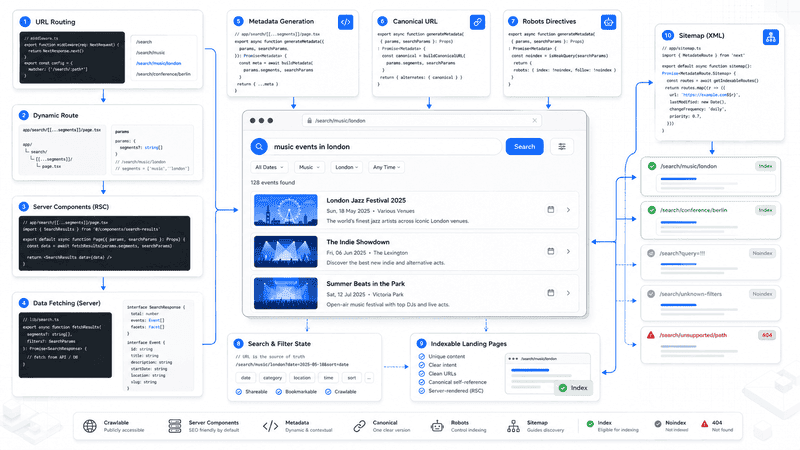
Building search pages is easy. Building search pages that search engines can understand is much harder.
Modern applications often let users combine categories, locations, keywords, sorting options, and pagination. Every change creates another URL. Without a clear strategy, thousands of nearly identical pages appear, wasting crawl budget and creating duplicate content.
The Next.js App Router provides everything needed to solve this problem. Dynamic routes, Server Components, metadata generation, and route-based rendering make it possible to create clean, indexable landing pages while keeping user-generated searches outside the search index.
In this article, we’ll build an SEO-friendly filtering system inspired by an event directory called EventMap. The project is only an example, but the architecture can be applied to marketplaces, job boards, travel websites, e-commerce catalogs, and any application that relies on faceted search.
Why Search Pages Need an SEO Strategy
A search interface can generate an enormous number of URLs.
Imagine an event platform with:
- 10 categories
- 50 cities
- 5 sorting options
- pagination
- free-text search
Even before users type anything into the search box, that’s already thousands of possible URL combinations.
Not every combination deserves to be indexed.
Some pages represent stable collections that users might search for directly.
/search/music
/search/london
/search/music/london
Others exist only because of temporary user interactions.
/search?q=free+jazz
/search/music?page=8
/search/music?sort=price
Those URLs change constantly and rarely provide lasting value in search results. They should remain accessible to visitors without automatically becoming part of your indexed content.
Search Results vs Landing Pages
The most important architectural decision is separating user searches from SEO landing pages.
A free-text search depends entirely on user input.
/search?q=jazz
/search?q=concert+tonight
/search?q=free+events&page=3
Every visitor can generate a completely different URL. Titles and descriptions usually mirror the search query, and the results may change every day.
Landing pages work differently.
/search/music
/search/london
/search/music/london
Each page is built from a controlled list of values.
Your application already knows every supported category and city. That means you can generate consistent metadata, stable canonical URLs, internal links, and clear indexing rules for every valid combination.
Routing Multiple URL Variations
The App Router makes it easy to support multiple URL structures using an optional catch-all route.
app/
└── [locale]/
    └── search/
        └── [[...segments]]/
            └── page.tsx
This single route can handle all of these URLs.
/search
/search/music
/search/music/london
Instead of creating multiple route files, Next.js passes every path segment as an array.
type PageProps = {
  params: Promise<{
    locale: string;
    segments?: string[];
  }>;
  searchParams: Promise<
    Record<string, string | string[] | undefined>
  >;
};
Since Next.js 15, both params and searchParams are asynchronous Dynamic APIs. That means both your page and generateMetadata() should read them using await.
Choosing Between Path Segments and Query Parameters
Both of these URLs are technically valid.
/search/music/search?category=musicHowever, they serve different purposes.
Use path segments for small, predictable sets of values.
/search/music
/search/sports
/search/london
/search/music/london
Use query parameters for values that are unlimited or constantly changing.
/search/music?q=jazz
/search/music?page=2
/search/music?sort=date
This distinction keeps URLs clean while preventing unnecessary duplication.
Just as importantly, the order of path segments must always remain consistent.
Good:
/search/music/londonBad:
/search/london/musicBoth URLs describe the same page, but search engines see different addresses. Your application should always generate a single canonical structure.
Parsing Search Segments
Instead of scattering routing logic throughout the application, centralize it in a parser.
First, define the supported values.
export const knownCategories = [
  "music",
  "sports",
  "arts",
  "film",
  "family",
  "design",
  "food",
];

export const knownCities = [
  "london",
  "berlin",
  "new-york",
];
Then parse every incoming segment into a structured filter object.
export function parseSearchSegments(
  segments: string[] = [],
): Partial<SearchFilters> {
  const filters: Partial<SearchFilters> = {};

  for (const rawSegment of segments) {
    const segment = normalizeSearchValue(rawSegment);

    if (
      !filters.category &&
      knownCategories.includes(segment)
    ) {
      filters.category = segment;
      continue;
    }

    if (
      !filters.city &&
      knownCities.includes(segment)
    ) {
      filters.city = segment;
    }
  }

  return filters;
}
This approach keeps the routing logic predictable and reusable.
In a production application, the parser should also detect unknown values and duplicate segments. A URL such as /search/music/unknown-city should not silently display the same page as /search/music. It should trigger the appropriate SEO policy, whether that means returning a 404 or marking the page as non-indexable.
Building URLs from a Single Source of Truth
Search URLs appear in more places than most developers realize.
The same address is used for navigation, pagination, canonical URLs, language switching, metadata, and your sitemap. If every feature builds URLs independently, inconsistencies eventually appear.
Instead of concatenating strings throughout the application, create one reusable URL builder.
export function buildSearchHref({
  locale,
  filters,
}: {
  locale: Locale;
  filters: Partial<SearchFilters>;
}): string {
  const pathSegments = [
    filters.category,
    filters.city,
  ].filter(Boolean);

  const params = new URLSearchParams();

  if (filters.q?.trim()) {
    params.set("q", filters.q.trim());
  }

  if (filters.sort) {
    params.set("sort", filters.sort);
  }

  if ((filters.page ?? 1) > 1) {
    params.set("page", String(filters.page));
  }

  const path = pathSegments.length
    ? `/${locale}/search/${pathSegments.join("/")}`
    : `/${locale}/search`;

  const query = params.toString();

  return query ? `${path}?${query}` : path;
}
This builder enforces one canonical URL format across the entire application.
Notice a few small details.
- Empty search queries are ignored.
page=1is removed.- Category always comes before city.
- Query parameters appear only when needed.
Now every part of the application produces identical URLs.
Reusing the Builder Everywhere
Once a builder exists, every link should use it.
Instead of manually constructing URLs, generate them from structured filters.
<Link
  href={buildSearchHref({
    locale,
    filters: {
      category: category.slug,
    },
  })}
>
  {category.name}
</Link>
This has an important SEO benefit.
Search engines discover pages by following ordinary links. If every navigation element points to the same canonical URL format, crawlers can explore your search section efficiently without encountering unnecessary duplicates.
Why Server Rendering Matters
A common mistake is rendering search results entirely on the client.
"use client";

export default function SearchPage() {
  const [events, setEvents] = useState([]);

  useEffect(() => {
    fetch("/api/events")
      .then((response) => response.json())
      .then(setEvents);
  }, []);

  return <EventGrid events={events} />;
}
The initial HTML contains almost no useful content.
Search engines are much better at processing JavaScript today than they were a few years ago, but server-rendered pages still provide a faster, more predictable experience for both crawlers and users.
With the App Router, the page can read the URL before rendering.
export default async function SearchPage({
  params,
  searchParams,
}: PageProps) {
  const locale = await getLocaleFromParams(params);
  const { segments } = await params;

  const filters = parseSearchInput({
    segments,
    searchParams: await searchParams,
  });

  return (
    <SearchResultsSection
      locale={locale}
      filters={filters}
    />
  );
}
By the time the browser receives the response, the page already contains real search results instead of a loading spinner.
Fetching Data Inside a Server Component
Keeping the data request inside a Server Component makes the rendering pipeline much simpler.
export async function SearchResultsSection({
  filters,
  locale,
}: SearchResultsSectionProps) {
  const { events } = await getSearchPageEvents({
    filters,
    locale,
  });

  return (
    <div className="events-grid">
      {events.map((event) => (
        <EventCard
          key={event.id}
          event={event}
          locale={locale}
        />
      ))}
    </div>
  );
}
This produces complete HTML before the page reaches the browser.
Interactive features such as favorites, filters, or sorting controls can still live inside Client Components, while the content that search engines need remains fully server rendered.
That separation is one of the biggest advantages of the App Router architecture.
Generating Metadata from the Same Filters
One of the easiest ways to introduce SEO bugs is letting the page and its metadata follow different logic.
Imagine the page displays events for Music in London, but the metadata describes only Music because a different parser was used.
The solution is simple.
Both the page and generateMetadata() should work with exactly the same parsed filters.
export async function generateMetadata({
  params,
  searchParams,
}: PageProps): Promise<Metadata> {
  const locale = await getLocaleFromParams(params);
  const { segments } = await params;

  const filters = parseSearchInput({
    segments,
    searchParams: await searchParams,
  });

  const meta = buildSearchMeta({
    filters,
    locale,
    currentPage: Math.max(filters.page, 1),
    totalCount: 1,
    totalPages: 1,
  });

  const seoPaths = buildSearchSeoPaths({
    filters,
    locale,
  });

  return toNextMetadata({
    title: meta.title,
    description: meta.description,
    noIndex: !meta.indexPolicy.shouldIndex,
    ...seoPaths,
  });
}
Using one parsing pipeline guarantees that your rendered content, metadata, canonical URLs, and robots directives always stay synchronized.
That dramatically reduces the chance of subtle SEO issues appearing as the application grows.
Canonical URLs and Duplicate Search Pages
A single search result can often be reached through several different URLs.
/search?category=music&city=london
/search/music/london
/search/london/music
/search/music/london?page=1
Although these addresses may display the same content, search engines treat them as separate pages. Without a canonical URL, they have to decide which version should appear in search results.
The safest approach is to normalize every incoming request before generating any SEO metadata.
First, convert the URL into a structured filter object.
{
  category: "music",
  city: "london",
  q: "",
  page: 1,
}
Then rebuild the URL using the same helper used everywhere else in the application.
/search/music/londonEvery variation now points to a single preferred address.
Building Canonical URLs
Rather than constructing canonical URLs manually, reuse the same URL builder that powers navigation.
export function buildSearchSeoPaths({
  filters,
  locale,
}: {
  filters: SearchFilters;
  locale: Locale;
}): SeoPaths {
  const getPath = (targetLocale: Locale) =>
    buildSearchHref({
      filters,
      locale: targetLocale,
    });

  return {
    canonicalPath: getPath(locale),
    languageAlternates: buildLocalizedAlternates(
      getPath,
    ),
  };
}
Generating canonical URLs this way ensures they always match the links users actually click.
Passing those values into the Metadata API is straightforward.
return {
  title,
  description,
  alternates: {
    canonical,
    languages,
  },
};
Everything stays synchronized because navigation, metadata, language alternates, and canonical URLs all depend on the same source of truth.
Every Landing Page Needs Its Own Canonical URL
Canonical tags should identify duplicate pages, not merge completely different ones.
These are unique landing pages.
/search/music
/search/sports
/search/london
/search/music/london
Each represents a different collection of content.
A common mistake is pointing every category back to the base search page.
/search/music
      ↓
/search
That tells search engines every category page is effectively the same document, which can prevent valuable landing pages from ranking.
Instead, every indexable landing page should reference itself as the canonical URL.
Deciding What Should Be Indexed
Not every valid URL deserves to appear in Google.
Consider these examples.
/search
/search?q=jazz
/search/music?sort=price
All three pages work perfectly from a user’s perspective, yet none of them necessarily provides enough value to become a search result.
A useful SEO policy separates pages into three groups.
- Indexable landing pages
- Search pages that remain accessible but use
noindex - Invalid URLs that return a 404
This distinction keeps the search index focused while allowing visitors to use every search feature.
Unknown URLs Should Not Show Valid Pages
Imagine someone visits one of these URLs.
/search/unknown-category
/search/music/unknown-city
Silently displaying the normal search page creates duplicate content under meaningless addresses.
Instead, unsupported values should be rejected.
In most cases that means returning a proper 404 response. Empty categories are a different case because they may become valid again after new content is published.
Your SEO policy should distinguish between invalid filters and temporarily empty results instead of treating them the same way.
Creating an Index Policy
Instead of scattering SEO rules throughout the project, centralize them inside one function.
function buildIndexPolicy({
  filters,
  totalCount,
  totalPages,
}: {
  filters: SearchFilters;
  totalCount: number;
  totalPages: number;
}): SearchIndexPolicy {
  const hasLandingFilter =
    Boolean(filters.category || filters.city);

  const isQueryOnly =
    Boolean(filters.q && !hasLandingFilter);

  const isOutOfRange =
    filters.page > totalPages;

  if (totalCount === 0) {
    return {
      shouldIndex: false,
      reason: "empty-results",
    };
  }

  if (isQueryOnly || isOutOfRange) {
    return {
      shouldIndex: false,
      reason: "weak-search-url",
    };
  }

  return {
    shouldIndex: hasLandingFilter,
    reason: hasLandingFilter
      ? "landing-page"
      : "search-page",
  };
}
Every page now follows exactly the same indexing rules, making SEO behavior easy to understand and maintain.
A Production Version Should Return Three States
For larger applications, a simple boolean is usually not enough.
A more expressive approach is using a dedicated type.
type IndexPolicy =
  | { type: "index" }
  | { type: "noindex" }
  | { type: "not-found" };
This keeps every possible SEO outcome explicit.
indexfor stable landing pagesnoindexfor temporary or user-generated searchesnot-foundfor invalid URLs
Keeping these states separate makes future SEO decisions much easier and prevents edge cases from slipping into production.
Pagination Requires Special Handling
Pagination often creates unnecessary SEO problems.
A page outside the available range should return a 404 instead of showing an empty result.
/search/music?page=999Valid pagination is different.
/search/music?page=2
/search/music?page=3
Each page contains different content, so each deserves its own URL and its own canonical tag.
Avoid pointing every paginated page back to page one. Search engines recommend treating each page as an independent document rather than collapsing the entire series into the first page.
Building a Sitemap for Search Landing Pages
A sitemap should contain pages that your application considers canonical, stable, and valuable enough to index.
It should not include every URL the search interface can generate.
These pages belong to user-driven search:
/search?q=jazz
/search?q=events+near+me
/search/music?q=free
They depend on temporary input and may produce weak, duplicated, or empty results. Adding them to a sitemap sends the wrong signal because a sitemap is supposed to describe the URLs you actively want search engines to discover and index.
Controlled landing pages are different.
/search/music
/search/sports
/search/london
/search/music/london
These URLs come from known categories and locations. Their metadata, internal links, canonical URLs, and indexing rules can be defined in advance.
Keep the URL Inventory Under Your Control
A sitemap should not depend directly on whatever an external search API returns today.
Imagine the events provider temporarily fails, removes a category, or returns an empty response. If your sitemap is generated from that unstable response, valid landing pages may disappear without warning.
The list of indexable URLs should live in a controlled source such as:
- a local configuration file
- a database table
- a CMS collection
- a dedicated SEO catalog
The live API can still provide the cards shown on each page. It should not decide which URLs exist in your SEO architecture.
Generating a Sitemap in the App Router
Next.js creates /sitemap.xml through a special app/sitemap.ts file.
A reusable builder can generate entries from the known locales and categories.
import type { MetadataRoute } from "next";

export function buildSearchSitemapEntries():
  MetadataRoute.Sitemap {
  return locales.flatMap((locale) =>
    searchCategories.map((category) =>
      createSitemapEntry({
        path: buildSearchHref({
          locale,
          filters: {
            category: category.slug,
          },
        }),
        changeFrequency: "daily",
        priority: 0.8,
      }),
    ),
  );
}
This version uses the same URL builder as navigation and canonical metadata. That keeps the URL format consistent across the application.
The sitemap file itself remains small.
import type { MetadataRoute } from "next";
import {
  buildSearchSitemapEntries,
} from "@/entities/seo/buildSearchSitemapEntries";

export default function sitemap():
  MetadataRoute.Sitemap {
  return buildSearchSitemapEntries();
}
The route now returns only URLs selected by the application, rather than every possible filter combination.
Do Not Mix Noindex Pages with Sitemap Entries
A page should not appear in the sitemap while also returning noindex.
Those two signals contradict each other.
For example, suppose the base search route behaves like this:
/searchIts metadata contains:
<meta name="robots" content="noindex, follow">But the same URL appears in sitemap.xml.
The sitemap says the page is important enough to submit for indexing, while the robots directive says it must not appear in search results.
Choose one policy.
Either remove the base search page from the sitemap, or turn it into a real landing page with enough stable content to justify indexing. The original project still required this production fix.
Adding Category and City Combinations
Some projects need more than category-only pages.
You may also want indexable pages for cities and selected category-city combinations.
A naive implementation could generate every possible pair.
const combinations = categories.flatMap((category) =>
  cities.map((city) => ({
    category: category.slug,
    city: city.slug,
  })),
);
That works technically, but it may create hundreds or thousands of thin landing pages.
A safer approach is to maintain an explicit list of approved combinations.
type SearchLandingPage = {
  category?: string;
  city?: string;
  priority: number;
};

export const searchLandingPages:
  SearchLandingPage[] = [
    {
      category: "music",
      priority: 0.9,
    },
    {
      city: "london",
      priority: 0.8,
    },
    {
      category: "music",
      city: "london",
      priority: 0.9,
    },
    {
      category: "arts",
      city: "berlin",
      priority: 0.7,
    },
  ];
The sitemap builder can then work from this controlled inventory.
export function buildSearchSitemapEntries():
  MetadataRoute.Sitemap {
  return locales.flatMap((locale) =>
    searchLandingPages.map((landingPage) =>
      createSitemapEntry({
        path: buildSearchHref({
          locale,
          filters: {
            category: landingPage.category,
            city: landingPage.city,
          },
        }),
        changeFrequency: "daily",
        priority: landingPage.priority,
      }),
    ),
  );
}
This gives the SEO team or content team direct control over which combinations are indexable.
Building One Shared Search Pipeline
The strongest part of this architecture is not any individual function. It is the way every function works from the same normalized state.
The complete flow looks like this:
params + searchParams
        ↓
parseSearchInput
        ↓
SearchFilters
        ↓
buildSearchHref
        ↓
page rendering
metadata
canonical URLs
language alternates
internal links
sitemap entries
Incoming URL data is parsed once.
The result becomes a structured SearchFilters object. Every other part of the system reads from that object instead of interpreting the URL independently.
This reduces duplication and prevents subtle disagreements between the page, metadata, canonical URL, and sitemap.
A More Complete Parser Result
A production parser should return more than valid filters.
It should also report invalid and duplicated segments.
type ParsedSearchInput = {
  filters: SearchFilters;
  unknownSegments: string[];
  duplicateSegments: string[];
};

export function parseSearchSegments(
  segments: string[] = [],
): ParsedSearchInput {
  const filters: SearchFilters = {
    category: undefined,
    city: undefined,
    q: "",
    page: 1,
    sort: undefined,
  };

  const unknownSegments: string[] = [];
  const duplicateSegments: string[] = [];

  for (const rawSegment of segments) {
    const segment = normalizeSearchValue(rawSegment);

    if (knownCategories.includes(segment)) {
      if (filters.category) {
        duplicateSegments.push(segment);
      } else {
        filters.category = segment;
      }

      continue;
    }

    if (knownCities.includes(segment)) {
      if (filters.city) {
        duplicateSegments.push(segment);
      } else {
        filters.city = segment;
      }

      continue;
    }

    unknownSegments.push(segment);
  }

  return {
    filters,
    unknownSegments,
    duplicateSegments,
  };
}
Now the page can distinguish a valid landing page from a malformed URL.
import { notFound } from "next/navigation";

export default async function SearchPage({
  params,
  searchParams,
}: PageProps) {
  const { segments } = await params;

  const parsed = parseSearchInput({
    segments,
    searchParams: await searchParams,
  });

  if (
    parsed.unknownSegments.length > 0 ||
    parsed.duplicateSegments.length > 0
  ) {
    notFound();
  }

  const result = await getSearchPageEvents({
    filters: parsed.filters,
  });

  if (parsed.filters.page > result.totalPages) {
    notFound();
  }

  return (
    <SearchResultsSection
      filters={parsed.filters}
      result={result}
    />
  );
}
This prevents malformed addresses from rendering the same content as valid pages.
Keeping Metadata and Page Logic Consistent
The page and generateMetadata() should not repeat the same validation rules separately.
A better approach is to create one resolver.
type ResolvedSearchPage = {
  filters: SearchFilters;
  result: SearchPageResult;
  indexPolicy: IndexPolicy;
};

export async function resolveSearchPage({
  params,
  searchParams,
}: PageProps): Promise<ResolvedSearchPage> {
  const { segments } = await params;

  const parsed = parseSearchInput({
    segments,
    searchParams: await searchParams,
  });

  if (
    parsed.unknownSegments.length > 0 ||
    parsed.duplicateSegments.length > 0
  ) {
    return {
      filters: parsed.filters,
      result: emptySearchResult,
      indexPolicy: {
        type: "not-found",
      },
    };
  }

  const result = await getSearchPageEvents({
    filters: parsed.filters,
  });

  const indexPolicy = buildIndexPolicy({
    filters: parsed.filters,
    totalCount: result.totalCount,
    totalPages: result.totalPages,
  });

  return {
    filters: parsed.filters,
    result,
    indexPolicy,
  };
}
Both the page and metadata can call this resolver.
export default async function SearchPage(
  props: PageProps,
) {
  const resolved = await resolveSearchPage(props);

  if (resolved.indexPolicy.type === "not-found") {
    notFound();
  }

  return (
    <SearchResultsSection
      filters={resolved.filters}
      result={resolved.result}
    />
  );
}
Metadata uses the same state.
export async function generateMetadata(
  props: PageProps,
): Promise<Metadata> {
  const resolved = await resolveSearchPage(props);

  if (resolved.indexPolicy.type === "not-found") {
    return {};
  }

  const meta = buildSearchMeta(resolved);

  return {
    title: meta.title,
    description: meta.description,
    alternates: {
      canonical: meta.canonical,
      languages: meta.languages,
    },
    robots: {
      index: resolved.indexPolicy.type === "index",
      follow: true,
    },
  };
}
The page content and SEO metadata can no longer disagree because they depend on the same resolved result.
Final Architecture
A reliable search section in Next.js should follow a few clear rules.
Use controlled path segments for stable categories, cities, and approved combinations.
Keep free-text queries, sorting options, and most pagination state in the query string.
Parse every URL through one shared function.
Build navigation, canonical URLs, language alternates, and sitemap entries with the same URL builder.
Render important content on the server.
Return noindex for useful but weak search pages.
Return 404 for unsupported filters, malformed paths, and pages outside the available pagination range.
Keep the sitemap limited to canonical URLs that the application explicitly wants indexed.
The final result is not just a search page with metadata attached. It is a complete URL system in which routing, rendering, internal links, canonical tags, robots rules, and sitemap generation all follow the same source of truth.
The original implementation still had two production tasks left: unknown path segments needed to return 404, and the base /search route needed to be removed from the sitemap while it remained noindex.